> For the complete documentation index, see [llms.txt](https://docs.saferpay.com/home/llms.txt). Markdown versions of documentation pages are available by appending `.md` to page URLs; this page is available as [Markdown](https://docs.saferpay.com/home/integration-guide/general-information/iframe-integration-and-css.md).
# Iframe Integration and CSS
The Saferpay Payment Page, the transaction interface and Secure Card Data offer the options for iframe integration and custom design using Cascading Style Sheets (CSS). The following describes how these features can be used and what needs to be adhered to.
## Iframe Integration
Iframe integration is supported for these methods/flows:
* [PaymentPage Initialize](https://saferpay.github.io/jsonapi/#Payment_v1_PaymentPage_Initialize)/[Payment Page](/home/integration-guide/licences-and-interfaces/payment-page.md)
* [Transaction Initialize](https://saferpay.github.io/jsonapi/#Payment_v1_Transaction_Initialize)/[Transaction Interface](/home/integration-guide/licences-and-interfaces/transaction-interface.md)
* [Alias Insert](https://saferpay.github.io/jsonapi/#Payment_v1_Alias_Insert)/[Standalone Secure Card Data Registration](/home/integration-guide/licences-and-interfaces/secure-card-data.md#standalone-secure-card-data-registration)
The response message includes a respective **RedirectURL**, if successfully executed. This URL needs to be embedded in the iframe.
### Iframe support
The following payment methods **do not** support the Iframe integration.
* [Account-to-Account](/home/integration-guide/payment-methods/account-to-account-payments.md)[ Payments](/home/integration-guide/payment-methods.md)
* [PayPal](/home/integration-guide/payment-methods/paypal.md)
* [iDeal](/home/integration-guide/payment-methods/ideal.md)
* [eps](/home/integration-guide/payment-methods/eps.md)
* [Postfinance Pay](/home/integration-guide/payment-methods/swiss-postcard-and-postfinance.md)
For these payment methods, Saferpay will break out of the Iframe, so the payment may be performed, using a full-size payment page.
{% hint style="warning" %}
Please note that your **ReturnUrls** will then also be displayed in full size and not within your iFrame.
{% endhint %}
#### Pop-Up
Saferpay does not support pop-ups. Since most browser block pop-ups by default anyway, we highly recommend using other means, like lightboxes or direct iframe embedding into your site.
### Integration
The integration is really simple. Simply execute a [Payment Page Initialize](/home/integration-guide/licences-and-interfaces/payment-page.md#1-paymentpage-initialize-request), [Transaction Initialize](/home/integration-guide/licences-and-interfaces/transaction-interface.md#1-transaction-initialize), or an [Alias Insert](/home/integration-guide/licences-and-interfaces/secure-card-data.md#standalone-secure-card-data-registration) and use the **RedirectUrl** as the src-attribute value for the iFrame:
```markup
```
### iFrames and the CORS-policy
[Cross-Origin Resource Sharing (CORS)](https://en.wikipedia.org/wiki/Cross-origin_resource_sharing) is a security policy that handles the sharing of external ressources on a given website, for instance externally hosted JavaScript libraries, but also iFrames. If this policy is not followed in a correct manner, it can happen, that the iframe is blocked by the respective browser. When integrating Saferpay into an iFrame, please always consider this policy.
### Size of the iframe
The size of the iframe is communicated to the merchant via the `window.postMessage()` method, which can be captured using JavaScript. The iframe can thus be dynamically adapted to the content.
```markup
Payment Form
Payment Form
```
The message is transmitted in JSON format:
```javascript
{
"message":"css",
"height":450,
"width":650
}
```
JavaScript example for receipt of message (for jQuery >= 1.9)
```javascript
$(window).bind("message", function (e) {
if (e.originalEvent.data.height <= 450) return;
$("#iframe").css("height", e.originalEvent.data.height + "px");
});
```
{% hint style="warning" %}
Not every page reports its size to the merchant’s system. However, Saferpay has to forward users to third parties during the payment process (like with the 3D Secure procedure), thus we recommend a minimum size of 450x450 pixels, in case this feature is not supported by the site.
{% endhint %}
## Using CSS
{% hint style="warning" %}
The CSS feature should not be used with the [Saferpay Payment Page](/home/integration-guide/licences-and-interfaces/payment-page.md), as the feature is deprecated there. Please use the [Payment Page Configuration](/home/interfaces/backoffice/settings/payment-page-configuration.md) instead.
{% endhint %}
The use of Cascading Style Sheets (CSS) is available via the following methods/flows:
* [Transaction Initialize](https://saferpay.github.io/jsonapi/#Payment_v1_Transaction_Initialize)/[Transaction Interface](/home/integration-guide/licences-and-interfaces/transaction-interface.md)
* [Alias Insert](https://saferpay.github.io/jsonapi/#Payment_v1_Alias_Insert)/[Standalone Secure Card Data registration](/home/integration-guide/licences-and-interfaces/secure-card-data.md#standalone-secure-card-data-registration)
With a request using the **Styling** container, the **CssUrl** parameter must be forwarded, alongside a reference to the CSS file that is to be used.
### CSS Elements
All browsers include tools that simplify designing with CSS. CSS can thus be edited directly in the browser, and the results can be observed.
**Example for the Chrome browser**
With the right mouse button, click the item to be edited:

It opens a menu which shows the HTML code and the CSS classes with the corresponding attributes:
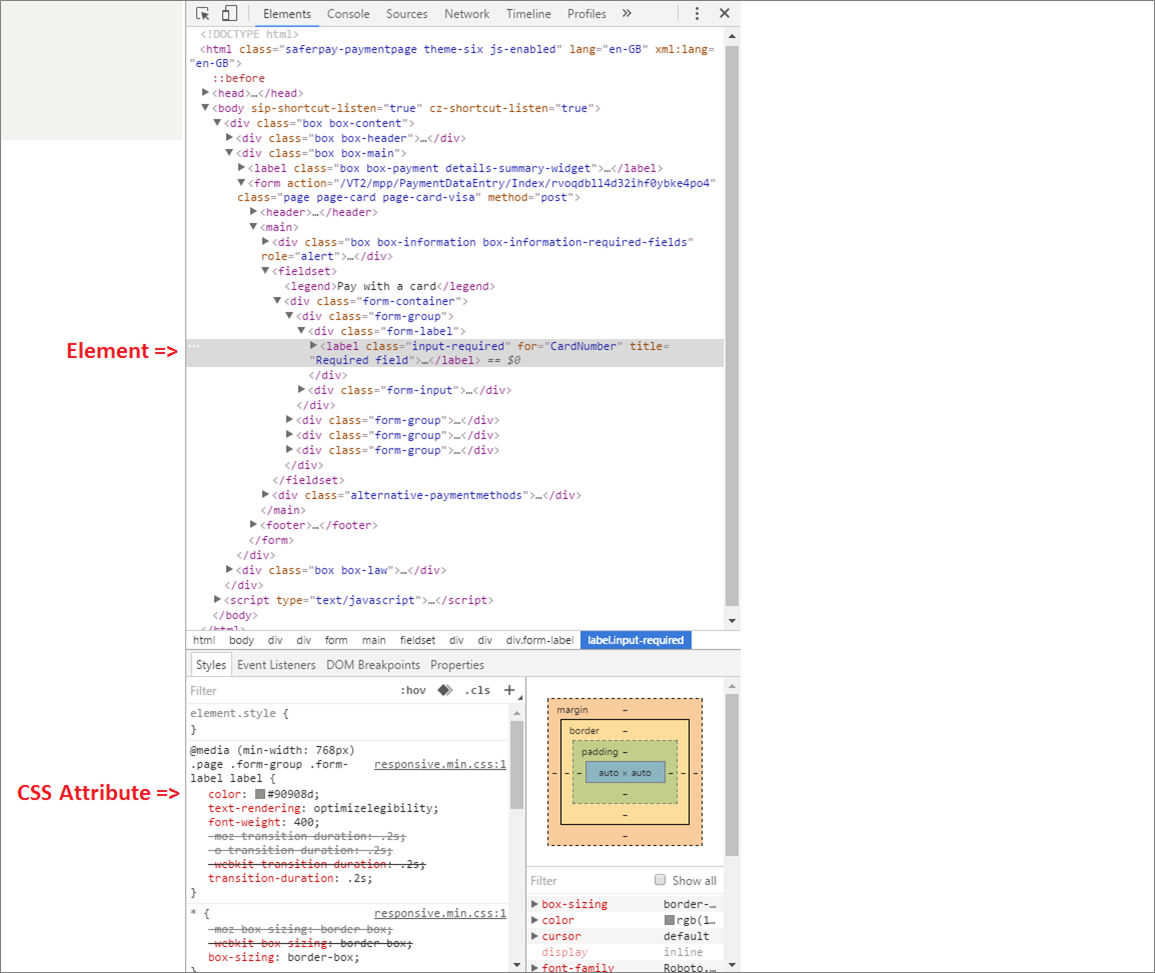
As an example, the text colour is adjusted here (CSS attributes can also be added and removed, if supported by the browser):
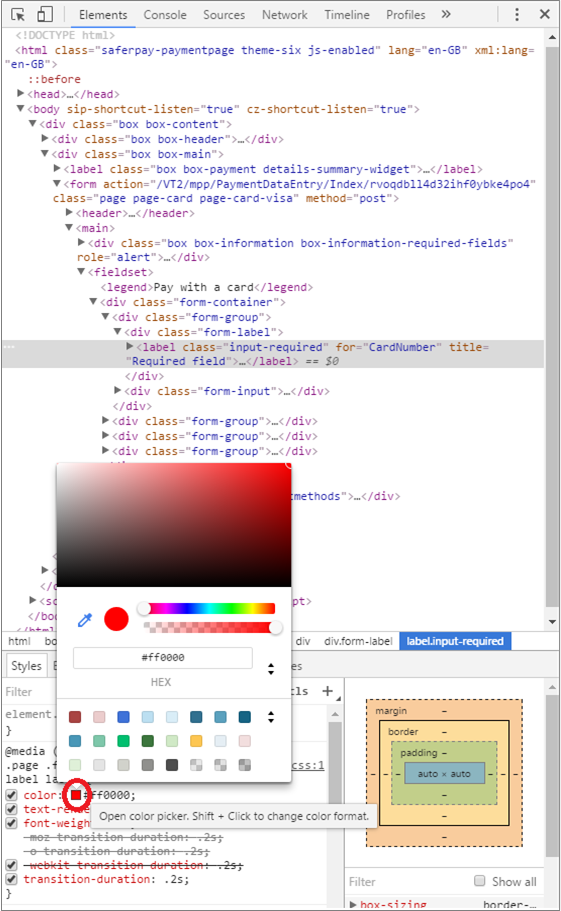
The change is immediately displayed in the browser. Then, the code simply needs to be transferred to the CSS file:

### Best practices
#### Do
* **Classes:** You should use the element class, in order to select the element you want to style.
* **Selectors:** As a principle, all CSS selectors for CSS1, CSS2 and CSS3 are supported, depending on the browser used.
#### Don't
* **Element ID:** Element ID should not be used because the ID may change without notice.
* **Element Attribute:** Element attributes should not be used, because attributes (name, value, data-\*, etc.) can change without notice.
* **Structure:** Do not rely on the HTML structure staying the way it is. You should not go through the elements in order, or rely on the number of nodes staying the way they are.
* Do not use (e.g.) nth-of-type(), sibling (+) selector, child(>) selector.
## Additional Information
* The CSS file that is referenced by the CssUrl parameter must be stored on a web server that supports HTTPS.
* When aiming for the [PCI DSS SAQ-A compliance](/home/integration-guide/general-information/data-security-and-pci-dss.md), you must set the **ContentSecurityEnabled** parameter inside the **Styling**-container to **true**. Furthermore, you have to consider the following things:
* Every bit of code must be contained within the same CSS file. Importing more than one file is not supported!
* External files (Images, Fonts etc.) must be loaded via a Data-Url within the CSS file itself!
* It is recommended to display a progress bar while something is loading in an iframe.
* The PCI specifications **do not** allow jumping into the iframe with JavaScript. So manipulating it using JavaScript is strictly prohibited!
* Some third party payment providers (e.g. PayPal) **do not** support the integration inside an iframe. Thus, the PaymentPage will break out of the iframe beforehand.
* Integrating Saferpay via an iframe will also cause the SuccessUrl to be called inside said frame. If you want to present the return pages in full size, you can break out of the frame yourself, using JavaScript.
#### Example of iframe breakout in JavaScript
{% hint style="warning" %}
Executing this code will re-load the return page, resulting in it being called twice.
{% endhint %}
```markup
Success Page
SOME HTML…
```
---
# Agent Instructions
This documentation is published with GitBook. GitBook is the documentation platform designed so that both humans and AI agents can read, navigate, and reason over technical content effectively. Learn more at gitbook.com.
## Querying This Documentation
If you need additional information that is not directly available in this page, you can query the documentation by asking a question.
Perform an HTTP GET request on the following URL with the `ask` and `goal` query parameters:
```
GET https://docs.saferpay.com/home/integration-guide/general-information/iframe-integration-and-css.md?ask=&goal=
```
`ask` is the immediate question: it should be specific, self-contained, and written in natural language.
`goal` is what the user is ultimately trying to achieve, the reason they need the answer. Sharing it helps GitBook give you a better, more relevant answer. A goal is most helpful when it describes the outcome the user wants rather than restating the question. For example, with `ask=how do I create an API token`, a goal like `automate deployments from our CI pipeline` lets GitBook tailor the answer to that use case.
The response will contain a direct answer to the question and relevant excerpts and sources from the documentation.
Use this mechanism when the answer is not explicitly present in the current page, you need clarification or additional context, or you want to retrieve related documentation sections.